
A Worldwide English Literacy Program
Totally Literate
For Scholars, Ages 5-105

TRWRR

With Heart 'n' Mind Entwined!
Read Aloud: Ctrl+Shift+U
Microsoft Edge

Microsoft Edge is super special. At Totally Literate, we think it’s the cat’s meow. Why? Because when you close your eyes, you can practically hear it purr!

-
It has several remarkable features. Herewith are just three:
-
It can read aloud our Totally Literate website in some 40 languages.
-
It can also translate English text into some additional 60 languages.
-
It enables users to put stories on the Immersive Reader platform, on a MS Word document, or on the Google Translate platform, where the stories can be read aloud, copied, and translated.
-
Other browsers have their unique strengths. Edge stands out for its built-in Immersive Reader and seamless integration with Word, OneNote, and PDFs—features that make it especially helpful for dyslexic, bilingual, and multisensory learners.”
-
To read text aloud, select any word wherever you'd like the narration to begin. To do so, left click twice on the word then right click on it. Then, from the pop-up menu choose,"Read aloud from here." Henceforth, the toolbar will remain open, atop of every page you visit.
-
However, before you visit another page you must stop the narration, otherwise the speaker will continue to read the page you are about to leave.
-
Voice Controls and Voice options are located on the toolbar shown below.
Voice Controls


-
In the Voice Controls box, a click on the middle pendant will activate Read out loud. And the other two pendants will either advance the narration or repeat it a sentence, a paragraph, or a bullet point with every click.
-
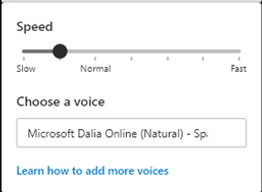
When you click on Voice options, a box like the one below will pop up. It allows you to change the voice (TTS speaker) as well as the speed of delivery. For now, however, we'll focus only on the latter function. To change the speed of delivery, merely slide the ball slightly one way or the other.
The Microsoft Edge Browser facilitates the use of practically every activity on our website. Most of which have myriad functions. Firstly, to help students of all nationalities—regardless of age and ability, with or without learning handicaps—have fun and learn to read in a surefire manner; secondly, to help foreign speakers learn English so well that they will speak it clearly and be easily understood; lastly, to help all students—irrespective of their native tongue—embark on one, two or more other languages for which they may have a propensity and a desire to learn.
