
Totally Literate
A Worldwide English Literacy Program
For Scholars, Ages 5 to 105

TRWRR
Ludwig van Beethoven, 1770-1827
Karl Böhm- Vienna Philharmonic Orchestra
The Pastoral Symphony, aka No. 6
In F Major, Opus 68
First movement
Second movement
Third movement
Fourth movement
Fifth movement

"Where Having Fun and Achieving Success Are One and the Same!"
Microsoft Word
How may Word be helpful to Totally Literate scholars?
There are a few ways:
-
Multilinguals (stories) can be pasted on a Word document.
-
On a Word document, multilinguals can be translated from English into a number of other languages and compared with one another side by side.
-
Multilinguals and the translations thereof can each be read aloud by "native" TTS speakers.
-
Word can change the look of text in numerous ways to make it easier and perhaps more fun for some.
-
On a Word document, the Immersive Reader can be toggled on and off,
-
To "Read Aloud," click Review then the "A" icon.

Below is a depiction of the Word ribbon:

-
To access Read Aloud and/or Translate, click Review.
-
To translate a selection or the whole document, click one of the options.
-
Under Translate on the far right, you have a choice of approximately 120 languages from which to choose.
-
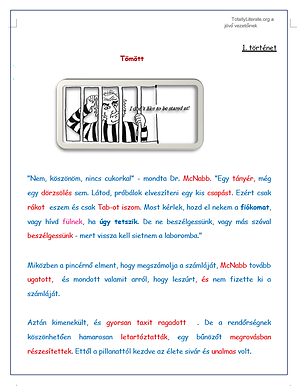
Once the document has been translated, it can be automatically read aloud by a native TTS voice. In this example it's Hungarian. The text of Story 1 is pictured below.
-
The photo below shows a Word document with all six Immersive Reader tools; namely, Column Width, Page Color, Line Focus, Text Spacing, and Read Aloud. To access these features, first click Review, then Immersive Reader.

Pictured below are examples of a multilingual translated into Italian and Portuguese.

English

Italian
Click here to learn how a PDF can be exported (converted) to Word.